
How to link your website to your Facebook Page or Profile for Insights
Generally speaking I consider myself to be a pretty decent social media expert. I spend hours every day reading about, thinking about and doing social media. It’s both my hobby and my job. Despite this, every now and then I come across social media things – big things – that I didn’t know about. When these things relate to Facebook, I get even more cross with myself. But then I think, is it really my fault, or should I blame Zuckers for being so shit at communication? Yep, I’m pretty sure it’s all his fault.

Anyway now that we’ve deflected all blame from me, let me get to the point. Today, on a search for insights-related information, I stumbled across a Facebook feature where you can link your website to either your own profile or one of your pages. I truly had no idea that this feature existed, so was unsure what it really meant. No better way to find out than give it a go. I used the fairly basic web skills/literacy I had to add a meta tag to my site, and voila, all of a sudden I had all these awesome stats right before my very eyes.
If you already knew about this, and are sitting there completely awe-struck at my ignorance, mentally erasing my name from your mind while you unlike my Facebook page, delete my website bookmark and unfollow me on Twitter, then you can exit this page now and have a great rest of your life.
However if you share my ignorance in this matter, and find it of interest you can read on. I’m going to first outline what insights you get access to by joining the two, and then tell you how to do it yourself if you think it’s as awesome as I do.
Website Facebook Insights
So what do you get by joining your website and your page/profile? A bunch of statistics that essentially let you know how many people are sharing your website content on Facebook, how many impressions you have gotten of that content on Facebook, and how many people have then visited your website through that shared content. For example, someone goes to my site and shares one of my articles on Facebook, because they find it to be just the right delightful mix of humour, information and insight (of course). This post of theirs is then seen 319 times by their Facebook friends and/or subscribers. 23 of these friends (the intellectual ones with awesome sense of humour) then click through to read the article themselves. All of these actions would be recorded in the Insights section.
Note: I have just discovered there seems to be a discrepancy in the statistics Facebook is displaying with the real share data on my site – over the past month there has been much more than 39 shares/likes, just going on the plug-in data (not even counting organic shares). I think this may be a result of Facebook not supporting the ‘Share’ button anymore (in this section it only lists Like, Send and organic share), but I’m not sure. Though it may not give 100% accurate information, I still find it to be really helpful.
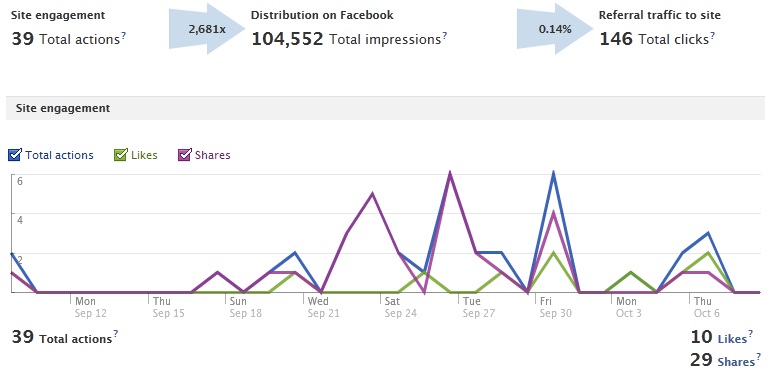
The graph above illustrates over the past month that a link to content on my site has been shared 39 times on Facebook, which has resulted in 104,552 total impressions and led to a click-through rate of 0.14%, or 146 people clicking through to my site.
Facebook then illustrates this data in graph format, so you can see when the links were shared, and whether they were shared by ‘likes’ or ‘shares’. Pretty cool.
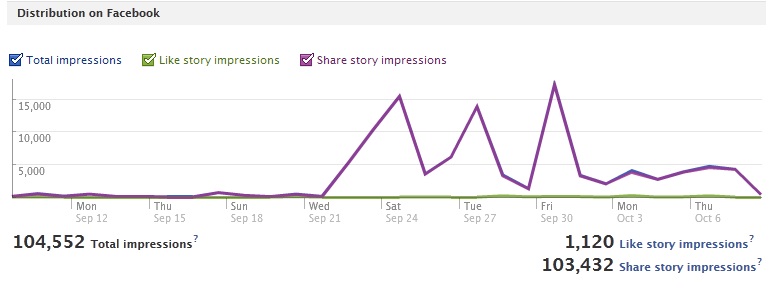
The next graph shows you how many impressions each type of share (like or share) received over the month. As you can see, the shares led to a much higher number of impressions than the likes. This was partially due to the fact there was almost three times as many shares as there were likes.
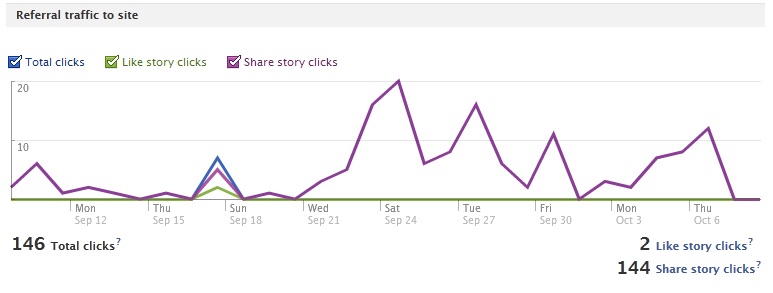
The last graph displays the total clicks over the time period, also displaying which came from ‘likes’ and which from ‘shares’. As you can see here, shares once again were much more successful than likes in encouraging people to click-through to my site.
There’s nothing earth-shattering about these stats, and you can track how many times your content is shared on Facebook through social plugins and analytics tools. However, the impressions and clicks data I had not been tracking previously through any third-party analytics services, so I find this really interesting.
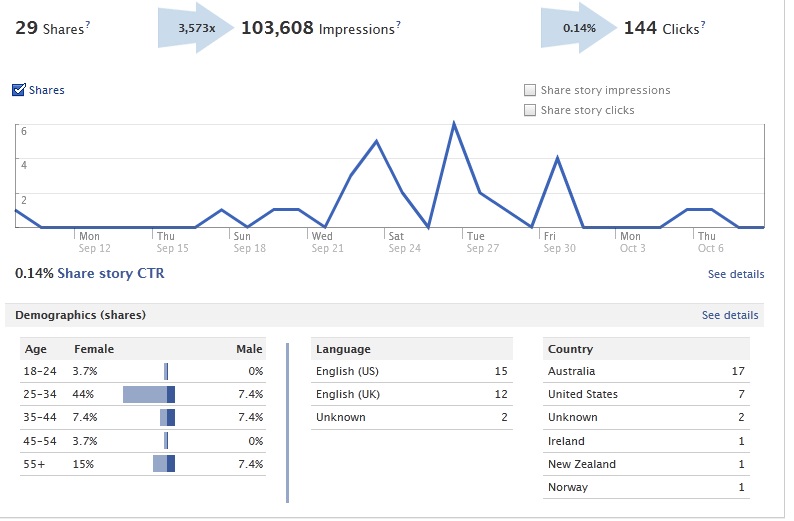
As if that wasn’t enough, Facebook also allows you to drill down further into each share type – the like button, send button, organic shares and the comments box. For each of these features that you are using on your site, you can drill down into more detail about the impressions and CTR per day, the demographics of people sharing your data and Popular Pages.
So how do you link your website with your Facebook Page?
It’s pretty easy.
- Go to www.facebook.com/insights
- Click on the ‘Insights for your website’ green button up the top right of the page
- Click on the ‘Link with’ drop-down menu (see pic below) and choose the Page you would like to link your site with. Or alternatively, you can link it with your own profile if you don’t have a Page for your website.
- Take the meta tag that Facebook displays underneath this drop-down menu and add it to your root webpage. I did this by editing the header.php file of my website, and sticking this meta tag in before . If you don’t know how to do this, you can probably google it or ask a web nerd you know to help you out. It took me a matter of seconds, so I can assure you it can’t be hard.
- Click ‘Get Insights’ and as long as you put the right meta tag into the right place, you’re done!
Did you know about this feature before? If so, please leave your derisive comments below. If not, please leave messages of encouragement and thanks below, so that I can feel safe and secure in the knowledge it wasn’t just me.
Lastly – what do you think about this? I was pretty excited to learn that my site had had over 100,000 impressions over just one month on Facebook, even though I’m not getting quite the same level of sharing as some OTHER social media sites (we know which is better, right?). But maybe it’s just me. Is it?


Hey! My name is Cara Pring and this is 

lol Your not the only one who lives in ignorance of this awesome feature
Was this answer helpful?
LikeDislikedfg
Was this answer helpful?
LikeDislikesdfdsfdsfds
Was this answer helpful?
LikeDislikeWow, thanks, I actually had nooo idea! I have a page for my website and I will connect it to my website
Thanks for this great info
Was this answer helpful?
LikeDislikeInformative article, and written in a humorous tone. I will try to apply your advice to my website/Facebook page combo.
Was this answer helpful?
LikeDislikeThis is a very cool feature!
Some people, however, you use it to sticks unwanted comments on someone else’s facebook pages.
When that happens, How do you get rid of thoses comments?
TR
Was this answer helpful?
LikeDislikeDo you mean put that code at the top of the home page or in the header.php file. Ive tried both with no luck?
Was this answer helpful?
LikeDislikeHi Graham, I mean put it in the header.php file. You could probably also do the footer.php. If it helps, I’ve got it just before /head
Let me know if that works – it’s definitely working for me!
Was this answer helpful?
LikeDislikeThanks so much for this fantastic information! I’m a technophobe who’s being dragged kicking and screaming into this social media world and your instructions enabled even me to do it… I’m impressed! Many thanks.
Was this answer helpful?
LikeDislikeQuestion – if I am and admin to two different Facebook pages – how do I add the insight to just one? In my case I’m an admin for Dallas Moms Blog and for Ultimate Pilates Plano but I only want the insight to be added to UP Plano. I don’t see any options in the Insights page to add it to just one page and I’m afraid that if I follow the steps then I’ll be adding the insight from the UP website to the DMB Facebook page. And that would be bad. thanks for the info and help!
~Amanda
Was this answer helpful?
LikeDislikeHi Amanda, I’m not 100% sure what you’re asking because that article is showing you how to track insights for a website, not a facebook page. It just tracks the Facebook-related insights (eg. shares, likes etc). Does that make sense? So you could definitely track the insights for just one of your websites and not the other. Your Facebook pages already have their own insights automatically
Was this answer helpful?
LikeDislikeThanks for the great info. I was looking this from quite sometime. Thanks for sharing.
Was this answer helpful?
LikeDislikeThankyou for this information. I had no idea how to link a website to Facebook. My website is still under construction as I am useless on a computer but when I eventually get it finished I will follow your instructions. Thanks again
Was this answer helpful?
LikeDislikehope
Was this answer helpful?
LikeDislikeI was looking for a way to link my website to my Facebook Page. Hope that the likes will effect my SEO!
Was this answer helpful?
LikeDislikeThis was definitely what I was looking for, but I almost wish I didn’t find the stats since they’re pretty pathetic at the moment.
Was this answer helpful?
LikeDislikeI need to connect my website from my facebook page.
Please tell me how can i do that easily?
I need to show an app or something, clicking on which people will be redirected to my Website.
Please help!
Was this answer helpful?
LikeDislikeHi Pearl, yes you’ll have to create an app on your Facebook page that can direct people to your website. The easiest way that I’m aware of would be to create a static image of your logo/site URL and perhaps the text ‘visit our site’ or similar, then when people click on the image it directs them to your website. Happy to explain further if you want to shoot me an email – cara [@] thesocialskinny.com
Was this answer helpful?
LikeDislikeThat was too easy………………. ty .
Was this answer helpful?
LikeDislikeyes is to easy way to go ur site other trafic……ty
Was this answer helpful?
LikeDislikethis is not opening
Was this answer helpful?
LikeDislikeWell I tried! I’m a computer illiterate and think I’ve messed up! I tried to tweet what I thought was meta tag … Whatever that is .. And twitter won’t let me tweet it saying its an error!! I’m trying to encourage our twitter followers to like our FB page and thought this link would o it ..help!
Was this answer helpful?
LikeDislikevery nice trick i didn’t know about it, i actualy want to link my website rss with tha page in facebook, but this trick is good too.
thanks
Was this answer helpful?
LikeDislikeI just poked around on facebook forever looking for instructions on how to do this, or where to do this. FInally just gave up and googled. Found you. Should have given up sooner.
Was this answer helpful?
LikeDislikewow thanks soo much…would use it for my site i am building http://www.triniclothing.com
Was this answer helpful?
LikeDislikeHi, thanks, I have been trying to link my website and Facebook page for ages, now I’ve done it following your instructions. I am very new to all of this, I get that Google is big on social media and adding value etc. and that it is very important to link to twitter, Facebook, YouTube etc. But my question is, naively, if you have a Facebook “like” button on your website, does this have any reflection or correlation to your Facebook page/ It does not seem to have (likes on webpage not the same number as on Facebook page for example). Thanks for your help so far anyway!
Was this answer helpful?
LikeDislikeI have a question. My website was built with an existing Facebook logo/link on it but I need when persons click on it for the logo/link to direct them to my Facebook page for the website. Does this also do that?
Was this answer helpful?
LikeDislikeHi I am trying to link my website to my facebook business page , following your directions I think but it still is not working. What I would love to do is add a tab for “shop on line” and then it goes directly to my pampered chef website
any help is appreciated
Was this answer helpful?
LikeDislikeI had no idea how to link a website to Facebook.
Was this answer helpful?
LikeDislikethanks you for idea for my website link for facebook.
Was this answer helpful?
LikeDislikeI am trying to link my tumblr to my FB using the insight app. But i get the following notification “Logged in user not authorized to view this domain.” Is this not possible?
Was this answer helpful?
LikeDislikeThank you! This is something that I never know about. I followed the instruction add am about to click the button Get Insights. I will see what will come out. Thank you once again, as this is a great post please keep us informed.
Best
Was this answer helpful?
LikeDislikeNow i worked. Thanks again!
Was this answer helpful?
LikeDislikehi – please something i can not see – they asking for meta tag ???
Was this answer helpful?
LikeDislikethat was easy and simple step.
Was this answer helpful?
LikeDislikeHello, I am new to facebook. Can anyone show me how to put a TARGET link to my site? I clicked on my post, it keep going back to my facebook profile? Please Advice, Thanks
Was this answer helpful?
LikeDislike